Phishing emails
How is the phishing process?
Phishers send false e-mails asking the user to update their data as a precaution, and these messages often contain links that direct the user to fake websites designed only to steal user information. Some people may ask how the hacker or the thief got the data in your mail, and answered the method of ownership of the whois domain data
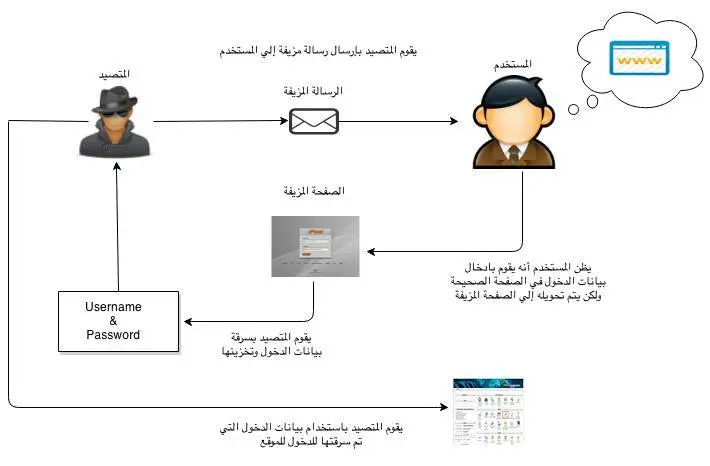
For example, the user is directed to a fake control panel page and the user enters the password thinking that it is a reliable page and when you enter it the person who steals the data will store it and by that he can enter your site.
Another way for trolls to unintentionally download malicious programs onto users ’devices allows them to access those devices or users’ information.
The following figure is a simplified illustration of the phishing process
Fake bills Bogus Invoices:
For example, sending a fake warning message telling the customer that a domain name has expired, and forcing him to pay a fake bill through the
It is another type of phishing message where fake invoices are sent via email or SMS for services or goods ordered by the customer.
Internet with one of the widespread payment methods.
Common errors to avoid phishing operations:
-
Most phishing emails don't refer to the recipient by name. Instead, it is usually a generic greeting without mentioning the username.
-
Phishing messages usually warn the user about losing their account if they do not fulfill the request addressed to them soon.
-
وجود أخطاء إملائية ونحوية واضحة في رسائل التصيد.
-
The link that the user is asked to click appears as directing the user to the correct site. But when you move the mouse pointer over the link, a small window appears that explains the actual link that will direct the user to the fake site.
How can protection from phishing operations?
-
Ensure the content of the message and do not click on any link except after checking it.
-
Do not download the attached files in messages that are anonymous or not expected to be received.
-
Browse websites using https: // protected protocol.
-
Installing anti-virus and protection programs in computers and ensuring that the operating system for the hardware and software used is up to date with the latest updates.
-
Change password constantly and do not use a single password for multiple sites.
-
Not to update any data except after confirming the company itself
In case of exposure to these or any suspicious messages, please follow these steps:
-
Not responding to any phishing messages.
-
Do not click on any anonymous link.
-
Contacting the technical support department contact us and provide us with a copy of these messages to be addressed.
-
Delete messages from the mailbox and ensure the trash is empty.
- phishers, رسائل التصيد, Bogus Invoices, الفواتير الوهمية, Phishing emails, Fake bills
- 51 Users Found This Useful


